Leave the desk. Keep the agent working.
Threadbase streams Claude Code, Codex, and GitHub Copilot sessions from your own machines to your phone. Approve, answer, queue the next prompt, or start a fresh session from anywhere. End-to-end encrypted. Nothing leaves your machines.
- iOS · TestFlight beta
- Android · closed testing
- macOS · Linux · Windows streamer
Keep every agent moving, wherever you are.
Walk away. We’ll tell you when the agent needs you.
Threadbase watches the session and pushes you the moment the agent stops for input. Not a stream you have to babysit.
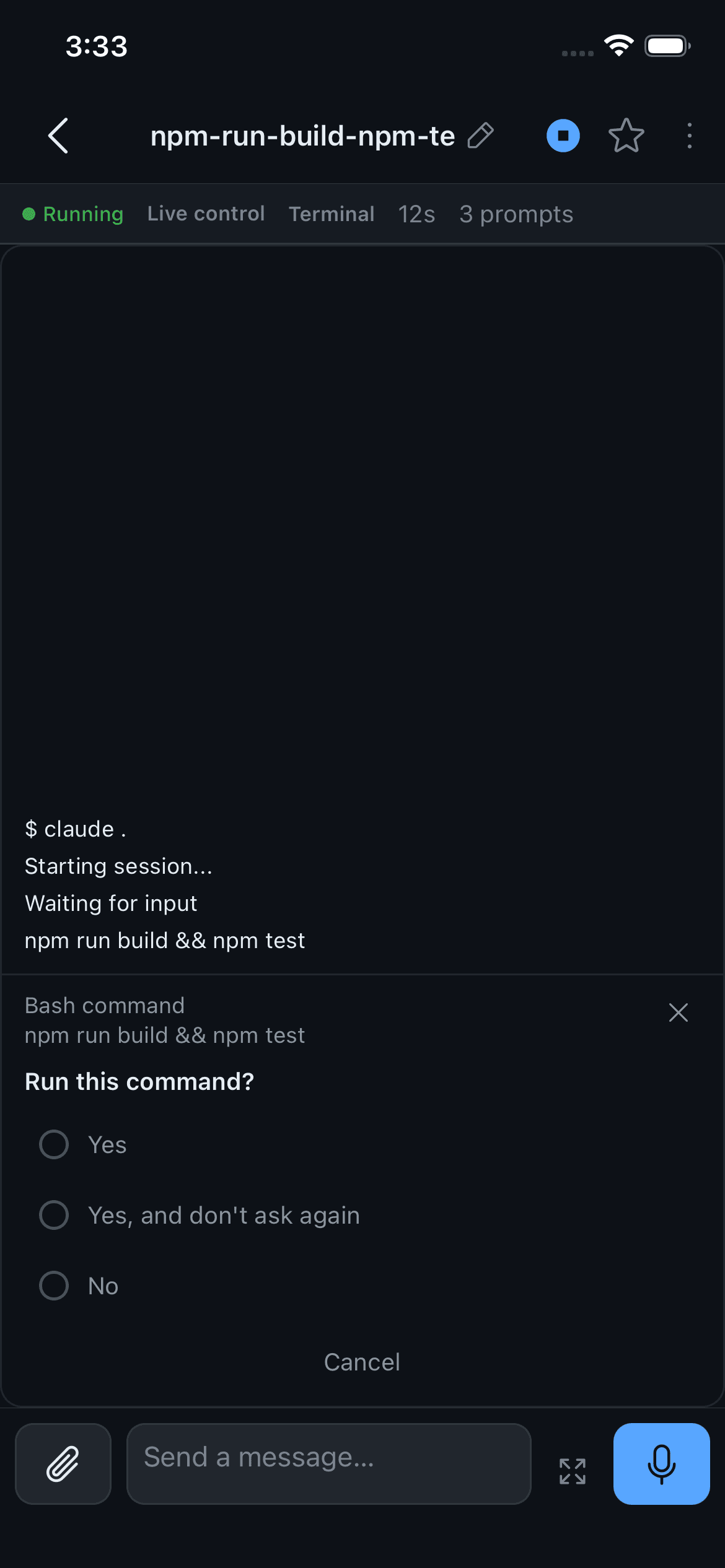
Approve without a tiny terminal.
Permission prompts and questions arrive as cards. Tap the answer. The agent keeps going.
Keep it fed.
Queue the next three prompts while the agent works. Dictate them. Attach a screenshot. It picks them up in order.
Start from your phone. Or take over.
Browse a machine's projects and launch a new session from the app — or adopt a session you started in your terminal and drive it from the phone.
Search everything.
Full-text search across every session on every machine, with snippets. Find the conversation where the agent explained that migration.
Every machine, one app.
Pair as many machines as you run. Each phone gets its own credentials you can revoke from the streamer at any time.
Built for the phone, not shrunk to it
- A terminal view that strips the TUI decorations so the transcript reads like a transcript.
- A chat view with diffs and tool calls, not a wall of ANSI.
- Face ID lock, Markdown export, favourites.
- English, Hebrew, Arabic, and Russian — with proper RTL.
Your streamer. Your machines. No Threadbase session relay.
Threadbase does not relay your coding-agent session through a Threadbase-hosted session backend. Sessions are end-to-end encrypted by default — Noise IK, X25519 and ChaCha20-Poly1305 — between your phone and each streamer. Every phone gets its own scoped credentials. Revoke one, and it's gone. Verify a machine's fingerprint with tb-streamer identity before you trust it.
What we can't see
- Your prompts, transcripts, approvals, and files never touch a Threadbase server — there isn't one.
- No analytics.
- Anonymous diagnostics — crash reports and basic stability data — are off by default and only ever sent because you switched them on.
- Feedback you write in Settings goes out when you tap send, and nothing else does.
- Keys live in the Keychain and Keystore.
- End-to-end encrypted by default
- Per-device credentials, one-tap revoke
- A streamer you control
- Multiple paired machines
This boundary describes the coding-session path. Pairing, notification delivery, and the local coding-agent process are separate parts of the architecture.
Beta, honestly.
Provider details differ
Claude Code, Codex, and GitHub Copilot are all supported, but approvals, recovery, and resume behavior can differ by provider.
You run the streamer
Install the local streamer on every machine you want to reach and keep it accessible from your phone. Reaching it from outside your network is on you — a Cloudflare quick-tunnel helper is included, a guided setup isn’t yet.
Distribution is still beta
iOS ships through TestFlight; Android ships through closed testing on Google Play.
Platform edges
On Windows, sessions started outside Threadbase can’t report their working directory. Homebrew on Linux is x86_64 only — use npm on arm64. iOS Live Activities are opt-in on the streamer and need your own APNs credentials.
Some prompts still need the terminal
Single-choice approvals and questions work from the phone. Multi-select and multi-question forms fall back to the raw terminal for now.
How it works
Run the streamer. Pair your phone. Keep working.
- Install the streamer on any machine that runs your agents.
- Pair your phone with a QR code — the keys are exchanged right there.
- Leave. We’ll push you when the agent needs you.
Pair more machines whenever you need them, then switch between their sessions from the same app.
Installation
Get up and running in under a minute.
# 1. Install the streamernpm install -g @threadbase-sh/streamer# Or use Homebrew on macOS/Linuxbrew tap RonenMars/threadbasebrew install tb-streamer# 2. Start ittb-streamer serve# Homebrew service mode also starts on loginbrew services start tb-streamer# 3. Open the Threadbase app on your phone# Tap "Pair" → scan the QR shown in your terminal# 4. (Optional) Pair more machines# Run the streamer on your Linux box, Windows PC, or a second Mac.# Pair each from the same app. Swipe between sessions.Configure Claude CLI flags per machine from the phone, switch model and effort mid-session, back up and restore streamer metadata, and check server and notification health without opening a terminal.
Open source, MIT, built by a developer who runs it every day.
Frequently asked questions
- Does it work with Codex?
- Yes. Claude Code, Codex, and GitHub Copilot sessions run side by side, with per-provider health and capability differences shown in the app.
- Do I have to open ports?
- No. Pairing over your LAN works out of the box. A bundled Cloudflare quick-tunnel helper gets you off-LAN without touching your router.
- What if my phone is offline when the agent asks?
- The push waits, and the session waits. Nothing times out because your phone was offline — open the app and you'll see what happened.
- Which platforms run the streamer?
- macOS, Linux, and Windows. See the honest list above for the platform-specific edges.
- Why is Sentry in the app?
- Two things you control: the feedback form in Settings, and Anonymous diagnostics — crash reports and basic stability data tagged with a random installation ID, off by default. Nothing is sent until you turn it on or tap send.
- What does it cost?
- Threadbase is free and open source under the MIT license. Self-host the streamer on your own machines.
Anything else, reach out at support
Leave the desk. Keep the session.
Join the iOS or Android beta, or subscribe for product updates.
Join the BetaStay in the loop.
Product news and updates from Threadbase, straight to your inbox.